
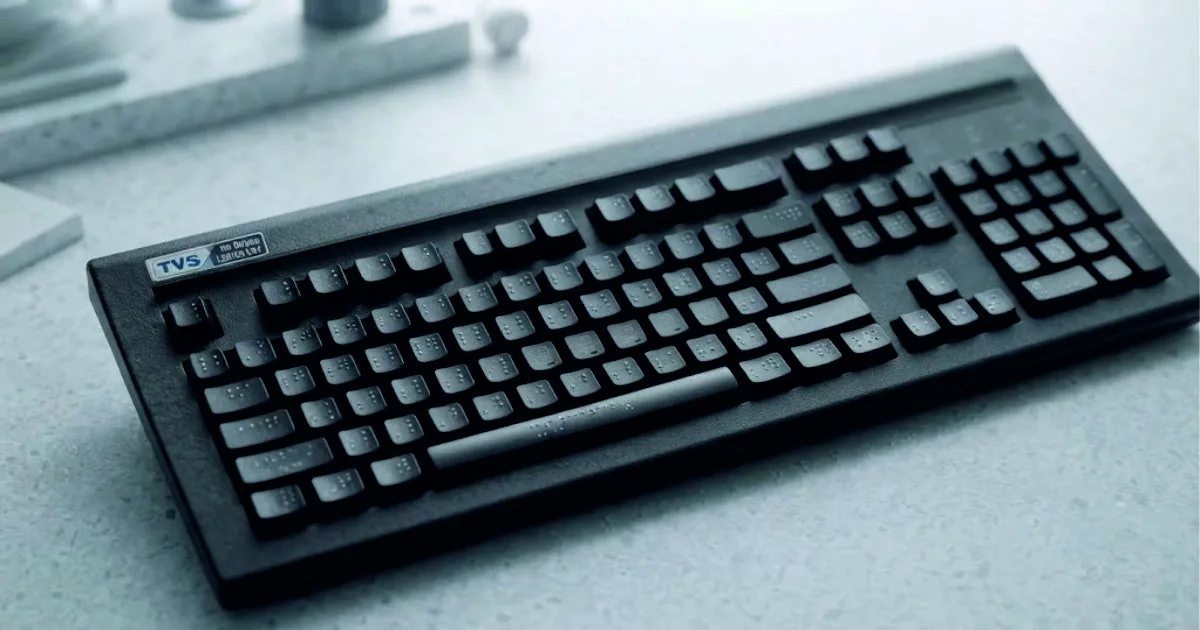
A Braille script keyboard uses 6 to 8 primary keys corresponding to the dots in a standard Braille cell. Users press multiple keys simultaneously (chording) to form letters, numbers, and contractions. These keyboards ra...
A Braille Script Keyboard (or simply a Braille keyboard) is a specialized typing device or virtual layout designed for blind or visually impaired individuals. Instead of using the standard QWERTY layout where every letter has its own key, a Braille keyboard relies on chording—pressing multiple keys simultaneously to form characters.
Here is a breakdown of how it works and the different types available:
How It Works (The 6-Dot Matrix)
Braille is based on a cell of 6 dots arranged in a $3 \times 2$ grid. A standard Braille keyboard translates this into a main row of keys:
-
Left Hand: Keys representing Dot 1, Dot 2, and Dot 3.
-
Right Hand: Keys representing Dot 4, Dot 5, and Dot 6.
-
Spacebar: Typically positioned in the middle, controlled by the thumbs.
To type a letter, you press the combination of dots at the same time. For example, pressing just the "Dot 1" key types the letter A. Pressing "Dots 1, 2, and 3" all at once types the letter L.
Main Types of Braille Keyboards
-
Virtual Touchscreen Keyboards: Modern smartphones have built-in accessibility features (like TalkBack on Android or VoiceOver on iOS) that turn the screen into a digital Braille keyboard. Users can hold the phone horizontally facing away from them or flat on a table to type using multi-touch gestures.
-
Physical Braille Displays & Input Devices: These are hardware devices that connect to computers or phones via Bluetooth or USB. Some, like the Hable One, are pocket-sized remote-like controllers. Others are Refreshable Braille Displays, which feature both a Braille keyboard for input and pins that physically rise and fall so the user can read the screen's text in Braille.
-
Mechanical Braille Writers (Perkins Brailler): The traditional "Braille typewriter." It doesn't connect to a computer but mechanically punches raised dots directly onto heavy paper.
Braille Script Keyboard offers life-changing benefits for individuals who are blind or visually impaired, while also providing unique advantages for power users who want to type without looking.
Here are the primary benefits of using a Braille script keyboard:
1. Drastically Increased Typing Speed
Standard QWERTY touch-typing requires moving hands and fingers across four rows of keys. A Braille keyboard uses chording (pressing multiple keys simultaneously), meaning the user's fingers never have to leave the home row. Once mastered, this eliminates the physical travel time between keys, allowing users to type at speeds that can rival or even exceed traditional typing.
2. High Portability and Compact Design
Because a Braille keyboard only requires 6 to 8 primary keys to input the entire alphabet, numbers, and punctuation, the physical hardware can be incredibly small.
-
Devices like the Hable One are the size of a small smartphone remote, allowing users to type easily while standing, riding the bus, or keeping their hands in their pockets.
-
It completely eliminates the need to carry a bulky, full-sized QWERTY keyboard.
3. Efficient Mobile and Touchscreen Navigation
Modern smartphones feature built-in virtual Braille keyboards (like TalkBack on Android or VoiceOver on iOS). This benefits users by:
-
Eliminating Hunt-and-Peck: Trying to target tiny individual digital letters on a smooth glass screen using audio feedback can be slow and frustrating.
-
Gestures for Control: Virtual Braille keyboards allow users to swipe left to delete a word, swipe right for a space, or use specific dot combinations to submit forms and open apps without changing layouts.
4. Seamless Reading and Writing Integration
When paired with a Refreshable Braille Display, a Braille keyboard provides a unified loop of communication. A user can type a sentence using the chording keys and instantly feel the pins rise on the display to proofread their work line-by-line. This is vital for editing complex documents, coding, or studying.
5. Reduced Cognitive Fatigue & Better Literacy
For native Braille readers, typing in Braille matches exactly how they think and read. Translating thoughts into a QWERTY layout requires a mental shift to a visual letter system. Typing directly in Braille—especially using Grade 2 contracted Braille (which uses short combinations for whole words like "the" or "ing")—reduces keystrokes and mental fatigue, reinforcing literacy.
6. True "Eyes-Free" Privacy
Standard typing or using voice-to-text dictates your messages out loud, compromising privacy in public spaces. A physical or virtual Braille keyboard allows for completely silent, private communication. Because the finger positioning is static, users can easily type messages while keeping their eyes and attention fully engaged on their surroundings.
Keetronics ( India ) Pvt. Ltd. One of the largest accessibility tech providers in the world. They manufacture the industry-standard Focus Blue series of refreshable Braille displays, which feature built-in 8-key Perkins-style keyboards.
Need a custom HMI architecture for harsh operating conditions?
Talk to Our Team