
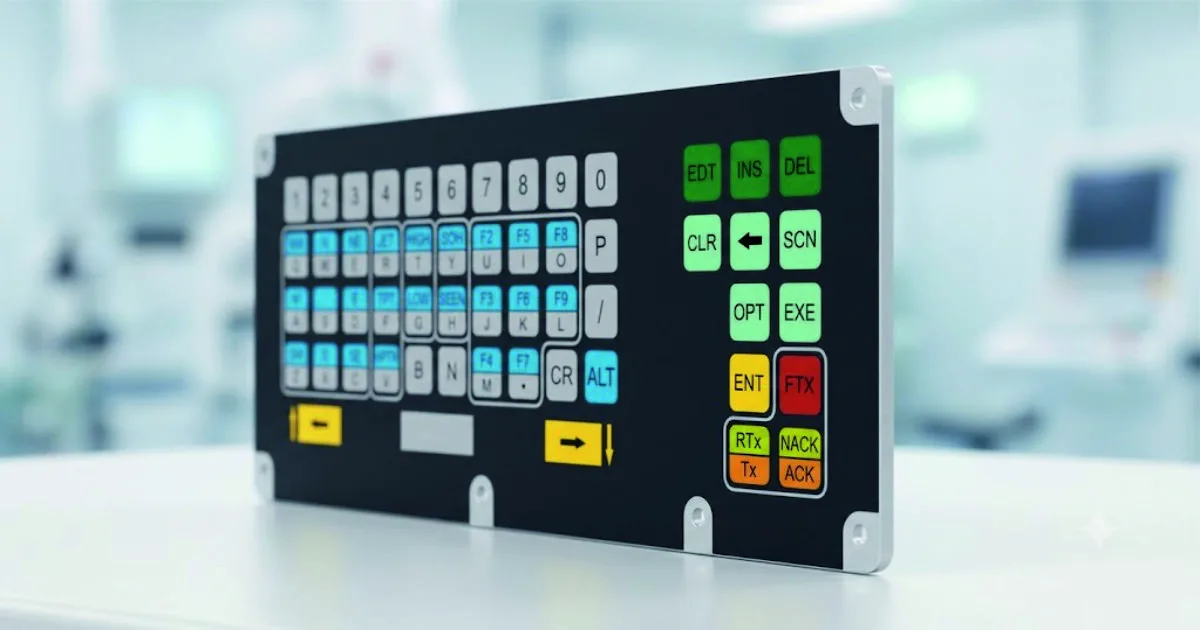
The text snippet you uploaded references a CNC Machine Operator Keypad. In specialized manufacturing settings, this layout is frequently integrated directly into a custom SPM (Special Purpose Machine) Operator Console C...
A CNC operator keypad is an industrial-grade interface built to survive dust, oil, and coolant. It translates operator inputs into controller commands. Typical units feature a QWERTY/MDI (Manual Data Input) section for programming, alongside dedicated function blocks for motion control, feed/spindle overrides, coolant, and cycle start/stop.
Keypad Zones & Functions
· Mode Selection: Keys to switch the machine's state (e.g., AUTO, EDIT, MDI, HANDLE/JOG).
· MDI / Data Entry: Alphanumeric keys for typing and editing G-code programs or setting tool and work offsets.
· Cycle Control: The critical Cycle Start (green) to run the program and Feed Hold (red) to pause the machine's movement instantly.
· Overrides: Rotary dials or membrane keys used to increase or decrease the machining Feed Rate and Spindle Speed in real-time.
· Manual Jog & MPG: Arrow keys and a handwheel (Manual Pulse Generator) to manually move the axis.
· Emergency Stop: The prominent, mushroom-shaped red E-Stop button that immediately cuts power to the drives.
A CNC machine operator keypad (or control panel keyboard) is a specialized hardware interface designed specifically for industrial machining environments. Unlike standard consumer keyboards or computer mice, industrial CNC keypads offer several critical benefits that directly impact safety, productivity, and machine longevity.
Here are the primary benefits of using a dedicated CNC machine operator keypad:
1. High Durability in Harsh Environments
Industrial machining floors are filled with elements that would quickly destroy standard electronics. CNC keypads are built to survive these conditions:
· Waterproof and Oil-Resistant: Most keypads carry high IP ratings (such as IP67), protecting the internal electronics from coolant, lubricating oils, and cutting fluids.
· Debris and Dust Protection: Utilizing sealed membrane designs or specialized mechanical keys, they prevent metal chips, fine dust, and grit from jamming the keys.
· Heavy-Wear Resistance: Keycaps are typically laser-engraved or made of thick ABS/acrylic to prevent the labels from rubbing off after years of continuous use.
2. Fast, Tactical Feedback and "Blind" Operation
When running a CNC machine, an operator's primary focus should be on the cutting tool and workpiece, not looking down at a screen.
· Tactile Domed Keys: Keys are designed with distinct physical feedback (clicking or snapping), letting the operator know a command was registered without needing to look.
· Muscle Memory: By having a consistent, physical layout, experienced operators can perform common adjustments, tool jogs, or feed changes entirely by touch.
3. Increased Safety & Emergency Access
Speed of input can be the difference between a successful run and a catastrophic machine crash.
· Instant Emergency Controls: Keypads feature immediate-access physical buttons like Emergency Stop (E-Stop), Feed Hold, and Cycle Start.
· Accidental Touch Prevention: Critical buttons are often spaced out, color-coded, or physically guarded with protective caps to prevent accidental triggers during operation.
4. Logical, Ergonomic Layouts
CNC keypads are organized into highly functional zones tailored to the machining workflow:
· Program Commands: Dedicated keys to quickly start, pause, reset, or single-step through G-code lines.
· Overrides (Feed & Speed): Rotary dials or dedicated buttons to adjust the feed rate override (FRO) and spindle speed on the fly, allowing the operator to optimize cutting conditions in real time.
· Jogging Keys: Arrow keys or manual pulse generator (MPG) interfaces grouped together to easily move the tool along the X, Y, and Z axes manually.
5. Reduced Human Error & Faster Training
· Custom Icons and Labeling: Instead of standard QWERTY keys, CNC keypads use clear, standardized industry icons for functions like coolant on/off, spindle direction, and tool indexing. This vastly simplifies the learning curve for new operators.
· Simplified Data Entry: Many keypads utilize specialized Manual Data Input (MDI) modes, allowing operators to enter quick coordinate values or single commands without diving into complex software menus.
Keetronics (India) Pvt. Ltd. is a pioneering Indian manufacturing company specializing in advanced electronics, custom Human-Machine Interface (HMI) solutions, and input devices. Established in 1994, the company has over 32 years of industry experience and has completed more than 7,000 projects globally.
Keetronics designs, develops, and manufactures high-quality custom interfaces and automation hardware, including:
- Industrial Input Devices: PCB & PCF membrane switches, rugged customized computer keyboards, and metallic industrial keyboards.
- HMI & Displays: Customized rugged industrial touch displays and HMI solutions tailored for harsh environments.
- Smart Automation: Smart touch switches for homes, offices, and hotels, alongside custom embedded solutions.
- Specialized Industries: High-reliability input devices engineered specifically for defense, military, aerospace, medical, and marine applications.
Keetronics designs, develops, and manufactures high-quality CNC machine operator keypad
Need a custom HMI architecture for harsh operating conditions?
Talk to Our Team